How to change the volume and reverb in Flat
Last updated October 13, 2026
The audio settings in Flat hold the playback mix of a score: a volume level and a reverb level for each of its instruments. Flat stores that mix inside the score data, so the balance you set is the one everyone with access to the score hears, on every device.
Where do I find the audio settings?
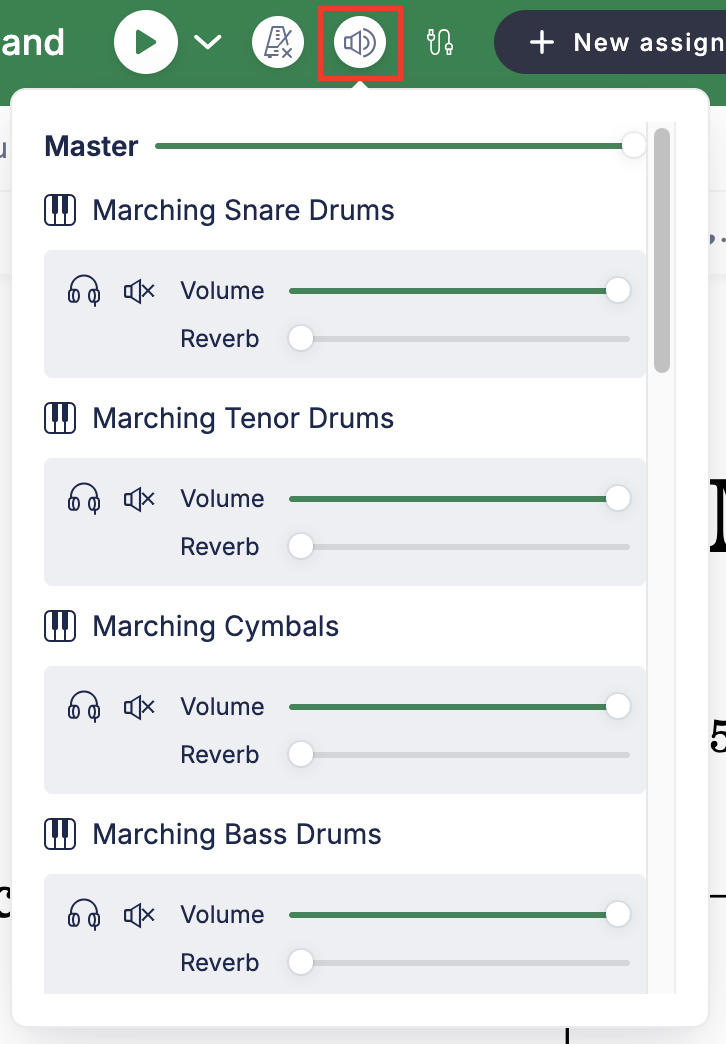
You can change the volume and reverb levels of each instrument in the audio settings. Access your audio settings by clicking the audio icon available in the top bar of your score, next to the playback controls. Each instrument gets its own pair of sliders.
What are the default volume and reverb levels?
By default, all the volumes are set at the maximum level, while reverb is turned off for each instrument. Anything you hear beyond that is coming from the score itself — its dynamics and its instrument samples — rather than from the mix.
Don't forget to save the changes. If you are not happy with them, just click Restore: the Restore button restores the saved volumes from the score settings.
Who else hears the mix I set?
Everyone who opens the score. When a slider is changed, it is automatically modified within the score data and synchronized on every device with access to the score, so every visitor gets the same audio mix that you set.
The audio settings are not a personal preference: they belong to the score. Changing them changes what your collaborators and your audience hear, not only your own playback.
Frequently asked questions
Are the audio settings saved per user or per score?
Per score. The volume and reverb sliders are written into the score data and synchronized to every device with access to it, so there is one mix for everybody rather than a personal setting for each listener.
How do I undo a change to the mix?
Click Restore. The Restore button brings back the volumes saved in the score settings, which is the mix as it was before your unsaved changes. Save only once you are happy with what you hear.
Why is one instrument much quieter than the others?
Check its volume slider first: the default is the maximum level, so a quieter instrument usually has had its slider lowered. If the sliders are level, the difference comes from the dynamics written in that part or from the instrument sample itself.
Does adding reverb change my score?
It changes how the score sounds, not what it says. Reverb is part of the playback mix stored with the score; it adds no marking to the notation and it is not included in the notation you print or export.