How to import a file from Finale?
Last updated September 8, 2026
To import your sheet music from any version of Finale into Flat, we advise you to use MusicXML. MusicXML is the standard exchange format for sheet music and includes all your notation details.
If you no longer have Finale installed to export from, you can also import a Finale *.musx file directly. We read it on a best-effort basis, without official support for the format.
Convert/Export your Finale file to MusicXML
Most Finale versions come with MusicXML export (including Finale NotePad 2012). In Finale, go to File → MusicXML → Export, or File → Export → MusicXML.
If your version of Finale can't export to MusicXML, or if you want a more accurate export, you can download and use the Dolet plugin.
Import a Finale file (*.musx) directly
If exporting MusicXML isn't an option, drag & drop your *.musx file into My Library, the same way as any other file.
This format isn't officially supported: some layout and notation details may not survive the conversion. When Finale is still available to you, exporting MusicXML gives the more faithful result.
Import your Finale MusicXML file on Flat
On Flat, go to My Library, then drag & drop your XML/MXL file. You can also click on Create score and choose Import file:
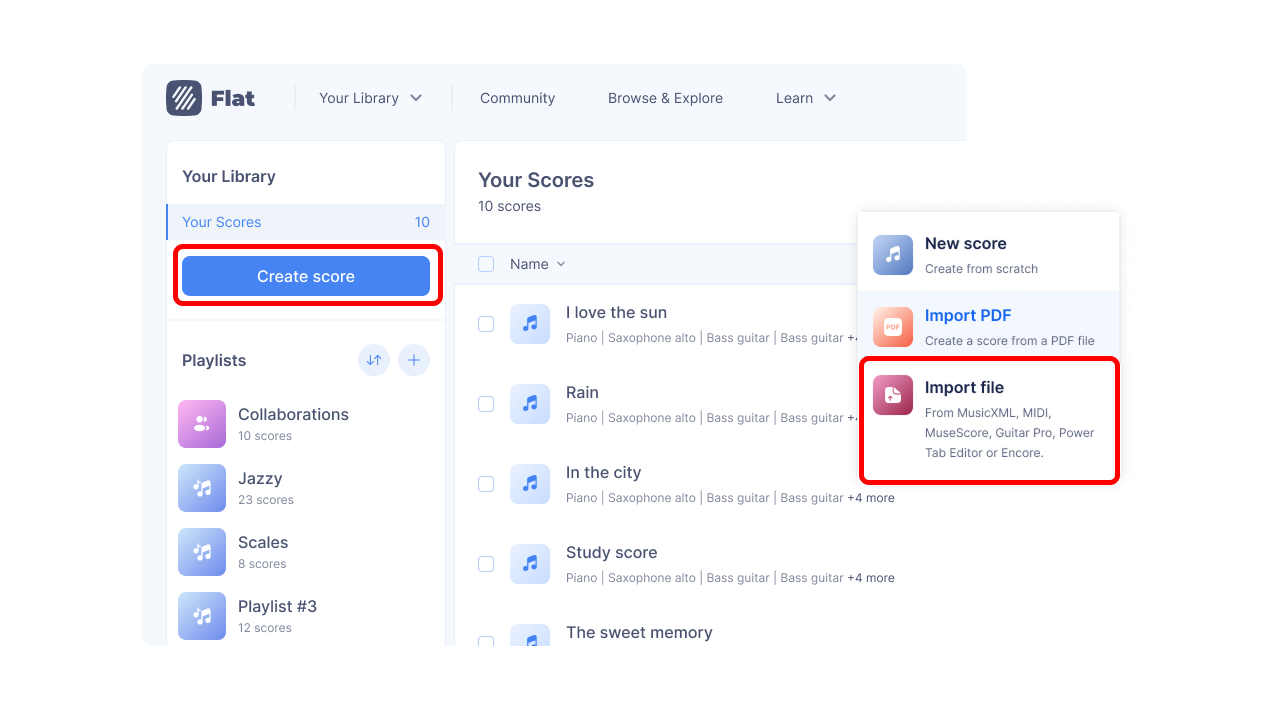
Choose your file(s) to import, and they will be directly added to your Flat account.
You can also export your scores back in MusicXML from Flat and open them with Finale.