Use Flat with ChatGPT, Claude and other AI assistants
Last updated October 19, 2026
The Flat connector lets an AI assistant such as ChatGPT or Claude work with the sheet music in your own Flat account. Ask it to save a melody it just wrote as a new score, find the string quartet you started last spring, or transpose a piece into a new key: it reads and creates scores for you, and you open the result in Flat's editor as usual.
The assistant only acts when you ask, never publishes anything, and you can remove its access from your account settings at any time.
Connecting an AI assistant requires an active Flat Power subscription. It is not yet available for Flat for Education accounts.
What your assistant can do
Once connected, the assistant can:
- Create a new score from notation it wrote or converted, in MusicXML, MIDI, ABC, MuseScore or Guitar Pro format. The score is added to your library as private, or with a private link if you ask for one.
- Search your library for your scores and collections by title, composer or instrumentation.
- Read a score's details: title, composer, instruments, duration and number of measures.
- Export a score's notation as MusicXML or MIDI, so it can analyse, arrange or transpose it.
A few things you can ask:
- "Write a four-bar melody in C major for flute and save it to my Flat account as Morning Study."
- "Which of my Flat scores are for string quartet?"
- "Open my score Nocturne in E flat and tell me what key it is in and where it modulates."
- "Take my score Nocturne in E flat, transpose it up a whole step, and save it as a new score called Nocturne in F."
What it cannot do
This is the initial version of the connector: it reads and creates scores, and we will add more capabilities in future versions. For now, the assistant cannot:
- edit an existing score: transposing or arranging always produces a new score, and the original is left untouched;
- publish a score, share it, or change its privacy;
- play audio or record anything;
- see scores that are not in your account;
- change your account, subscription or settings.
If you ask for one of these, the assistant will tell you to do it in Flat yourself.
If there is something you wish your assistant could do with your scores, tell us with Was this article helpful? at the bottom of this page: your suggestions help us choose what to add next.
Privacy and control
You approve the connection once, in Flat. The first time the assistant connects, Flat opens a permission page that names the app asking for access (for example ChatGPT or Claude) and shows the single permission it needs: Read and change the content of your Flat account. This covers every score in your library, private ones included. Nothing is shared until you click Allow access.
The assistant only sees what you ask about. It searches, reads or exports a score when your request needs it, and nothing runs in the background.
You can remove the connection at any time. Open your account settings, find the app under Link external accounts and apps, and click Unlink. The assistant loses access immediately. You can also disconnect from the assistant's side; each setup page below explains how.
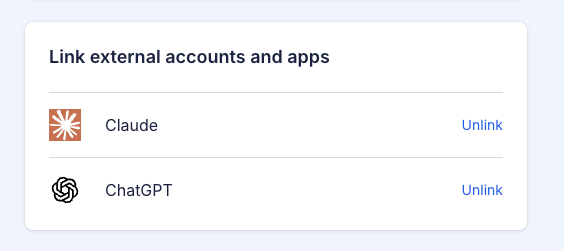
Connected assistants are listed with your other linked accounts, each with an Unlink button.
Building your own integration? The connector is a standard remote MCP server. The technical details are in our developer documentation.
Set up
Still stuck? Contact us - we are always one message away.