Scan and import sheet music from a PDF or photo
Last updated October 1, 2026
Turn a PDF, scan, or photo of sheet music into a fully editable score.
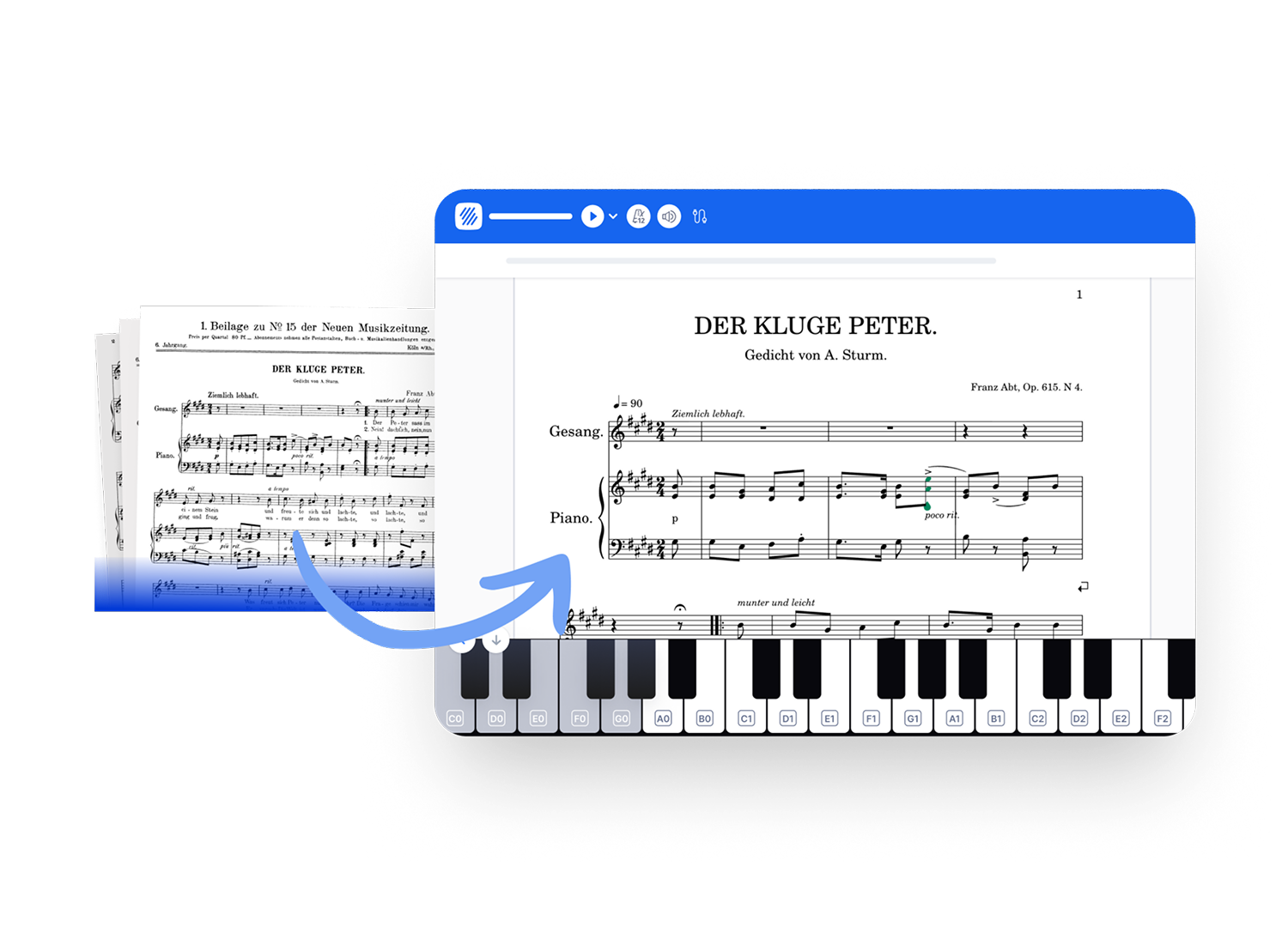
Flat uses AI-powered optical music recognition (OMR) to read the music printed on the page and rebuild it as real notation you can play, transpose, arrange, and share. You bring the sheet music, Flat does the typing.
How it works
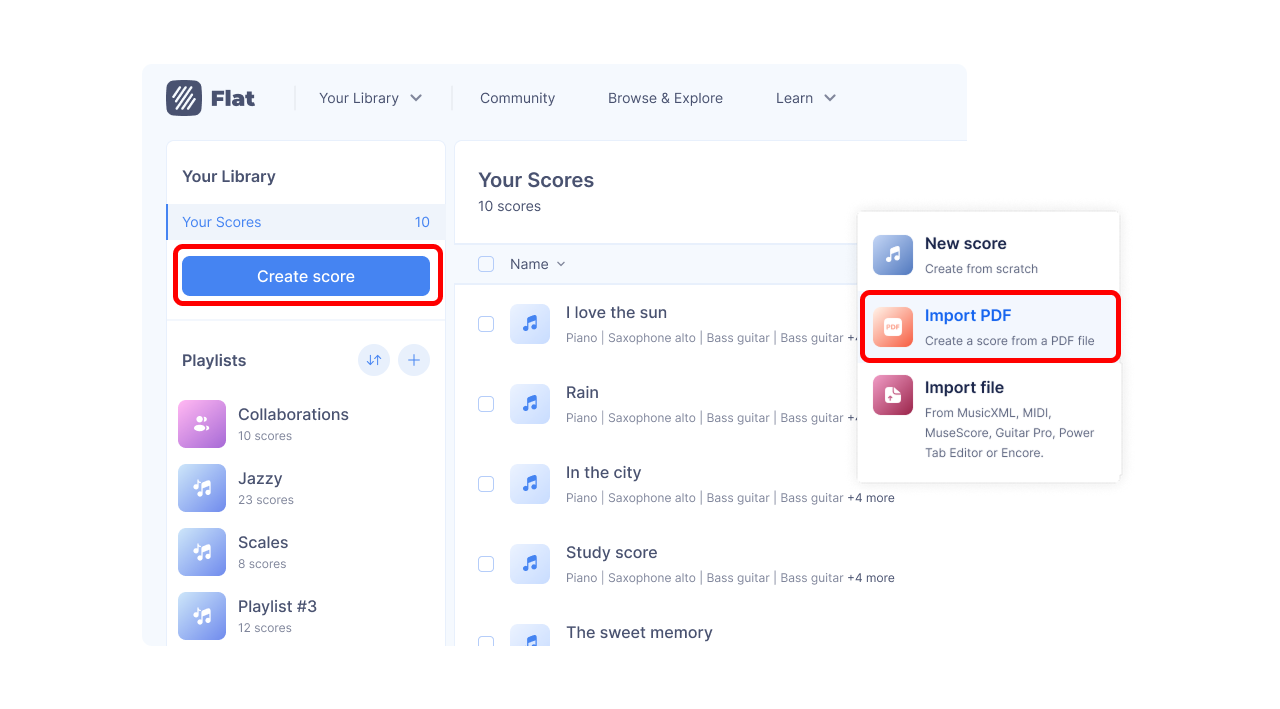
- Start a new score and choose to import a PDF.
- Flat scans each page and recognizes the staves, notes, and symbols.
- Your music opens as a fully editable score. Press play to hear it right away, then review, edit, transpose, and arrange.
Scanning costs one AI credit per page, taken when the scan starts. See how AI credits work for what your plan includes, whether unused credits roll over, and what happens if a scan fails.
What Flat can read
Flat's OMR is built for standard Western music notation that has been engraved: music typeset by notation software or professionally printed. That covers most sheet music, method books, parts, and lead sheets.
Works well
- Printed or digitally engraved sheet music, including scans and photos of printed pages
- Solo parts, piano and other grand-staff music, and multi-instrument scores
- Lead sheets with chord symbols
Not supported
- Handwritten or hand-copied music
- Tablature (guitar/bass tab), not yet supported
- Pages with no standard notation (text-only pages, lyrics-only sheets, cover pages)
Which notations are supported?
Within engraved Western notation, Flat recognizes a wide range of symbols, including:
| Category | What Flat recognizes |
|---|---|
| Clefs | Treble (G), bass (F), alto and tenor (C) in all positions, octave-shifted clefs (e.g. treble 8va/8vb, bass 8vb), and percussion clefs, including clef changes within a piece and parts that print the clef only on the first line |
| Key signatures | All key signatures, from 7 flats to 7 sharps |
| Time signatures | 2/2, 3/2, 4/2, 2/4, 3/4, 4/4, 5/4, 6/4, 7/4, 8/4, 9/4, 3/8, 5/8, 6/8, 7/8, 9/8, 10/8, 11/8, 12/8, 13/8, 14/8, 15/8, 3/16, 6/16, 9/16, 11/16, 13/16, 15/16, and 17/16, plus common time and cut time |
| Note values | Whole, half, quarter, 8th, 16th, 32nd, 64th, 128th, 256th, 512th, and 1024th notes, as well as breve, long, and maxima; with augmentation dots |
| Rests | Regular rests and multi-measure rests |
| Tuplets | Triplets and other ratios (for example 3:2, 2:3, 5:4, 6:4, 7:4, 7:8, 9:8, and more) |
| Beams | Standard beams, including partial beams, hooks, custom beaming patterns, and beams across rests |
| Pitches | The full pitch range, including ledger lines |
| Chords & voices | Chords, and multiple voices on a single staff |
| Accidentals | Sharp, flat, natural, double sharp, double flat, courtesy (cautionary), and microtonal (quarter-tone) accidentals |
| Ties & slurs | Ties and slurs |
| Grace & cue notes | Grace notes and acciaccatura, plus cue (small) notes |
| Dynamics | ppp, pp, p, mp, mf, f, ff, fff, plus sf, sfz, fz, fp, pf, rfz, sfp, sfpp, and sffz |
| Hairpins | Crescendo and decrescendo hairpins |
| Articulations | Staccato, staccatissimo, tenuto, accent, marcato (strong accent), detached legato, soft accent, spiccato, stress and unstress, breath marks, caesuras, and jazz marks (doit, falloff, plop, scoop) |
| Ornaments | Trill, mordent, inverted mordent, turn, inverted turn, and wavy line |
| Tremolos | Single-note tremolos and between-note tremolos (1 to 4 strokes) |
| Fermatas | Fermatas |
| Arpeggios | Arpeggios |
| Glissandos & slides | Glissandos and slides |
| Octave lines | 8va, 8vb, 15ma, and 15mb |
| Tempo | Metronome marks (with BPM) and gradual changes (rit. and accel.) |
| Barlines | Normal, double, final, repeat (start and end), and heavy-light barlines |
| Repeats & navigation | Repeat endings / voltas (1st through 8th), Segno, Coda, Da Capo, Dal Segno, To Coda, and Fine |
| Measure repeats | Single-bar repeats (%) and rhythm slashes |
| Noteheads | Standard, X, circle-X, cross, diamond, triangle, inverted triangle, square, slash, slashed, back-slashed, and hidden noteheads |
| Multi-staff instruments | Piano and other grand-staff instruments (up to 7 staves) |
| Percussion | Percussion staves and noteheads |
| Chord symbols | Chord symbols and chord charts, recognized as editable chords, not just text |
| Harmonics | Natural and artificial harmonics |
| Performance techniques | Fingerings, up-bow and down-bow, snap pizzicato, stopped notes, open strings, and thumb position |
| Pedal | Sustain pedal down, up, and change |
| Text & lyrics | Lyrics, rehearsal marks, and text annotations |
Latin-script languages (English, French, German, Italian, Spanish, and more) are recognized by default. Lyrics in Japanese, Korean, Chinese, and Cyrillic-script languages (Russian, Ukrainian, and Bulgarian) are recognized based on your account language and the regions where those languages are spoken.
File and page limits
Each scan has to fit within these limits.
| Limit | Current value |
|---|---|
| Pages per scan | 50 |
| Maximum file size | 100 MB |
| Scans running at the same time | 10 |
| AI credits per page | 1 |
| Accepted file types | PDF, JPEG, PNG, WebP, TIFF, GIF, AVIF, HEIC, HEIF |
Getting the best results
If it's hard for a human to read, it will be hard for Flat to read too. The cleaner and sharper your source, the better the conversion.
Recognition suffers most from:
- Low-resolution or blurry files
- Bent, warped, or curved staves (common when photographing a book near the spine)
- Faint, partially erased, or heavily marked-up notation
- Scanning artifacts, shadows, or skewed and rotated pages
- Scores where the number of staves changes from one system to the next
Also import a single piece per file, so Flat doesn't try to merge unrelated staves: keep one instrument per file for a solo part, and don't combine a full score and its separate instrument parts in the same file.
We improve recognition regularly. See the latest PDF & photo scanning updates.
Take OMR further
Automate OMR imports. Building an app or automating a workflow? The Flat developer API runs the same OMR engine programmatically: send PDFs or photos, follow progress, review the detected instruments, and import scores or export MusicXML at scale.
No Flat account? Opuscan is our standalone scan-to-score app: turn a PDF or photo into MusicXML and MIDI for your favorite music software.
Capture from your phone
On the Flat mobile app for iOS and Android, you can photograph sheet music directly inside the app instead of importing a file. Open Your Library, tap the + button, then tap Import PDF or a photo and choose Take a photo.
The in-app camera usually gives better results than a regular photo from your camera app: Flat uses dedicated on-device document scanning that automatically finds the page, crops it, and flattens the image before sending it for recognition. A cleaner capture means a cleaner conversion.
One PDF or photo at a time, 50 pages or fewer, clear and legible. Handwritten documents and files in landscape orientation are not accepted, and 1 credit covers 1 PDF page or 1 photo.
What Flat can read
Flat's OMR is built for standard Western music notation that has been engraved: music typeset by notation software or professionally printed. That covers most sheet music, method books, parts, and lead sheets.
Works well
- Printed or digitally engraved sheet music, including scans and photos of printed pages
- Solo parts, piano and other grand-staff music, and multi-instrument scores
- Lead sheets with chord symbols
Not supported
- Handwritten or hand-copied music
- Tablature (guitar/bass tab), not yet supported
- Pages with no standard notation (text-only pages, lyrics-only sheets, cover pages)
Which notations are supported?
Within engraved Western notation, Flat recognizes a wide range of symbols, including:
| Category | What Flat recognizes |
|---|---|
| Clefs | Treble (G), bass (F), alto and tenor (C) in all positions, octave-shifted clefs (e.g. treble 8va/8vb, bass 8vb), and percussion clefs, including clef changes within a piece and parts that print the clef only on the first line |
| Key signatures | All key signatures, from 7 flats to 7 sharps |
| Time signatures | 2/2, 3/2, 4/2, 2/4, 3/4, 4/4, 5/4, 6/4, 7/4, 8/4, 9/4, 3/8, 5/8, 6/8, 7/8, 9/8, 10/8, 11/8, 12/8, 13/8, 14/8, 15/8, 3/16, 6/16, 9/16, 11/16, 13/16, 15/16, and 17/16, plus common time and cut time |
| Note values | Whole, half, quarter, 8th, 16th, 32nd, 64th, 128th, 256th, 512th, and 1024th notes, as well as breve, long, and maxima; with augmentation dots |
| Rests | Regular rests and multi-measure rests |
| Tuplets | Triplets and other ratios (for example 3:2, 2:3, 5:4, 6:4, 7:4, 7:8, 9:8, and more) |
| Beams | Standard beams, including partial beams, hooks, custom beaming patterns, and beams across rests |
| Pitches | The full pitch range, including ledger lines |
| Chords & voices | Chords, and multiple voices on a single staff |
| Accidentals | Sharp, flat, natural, double sharp, double flat, courtesy (cautionary), and microtonal (quarter-tone) accidentals |
| Ties & slurs | Ties and slurs |
| Grace & cue notes | Grace notes and acciaccatura, plus cue (small) notes |
| Dynamics | ppp, pp, p, mp, mf, f, ff, fff, plus sf, sfz, fz, fp, pf, rfz, sfp, sfpp, and sffz |
| Hairpins | Crescendo and decrescendo hairpins |
| Articulations | Staccato, staccatissimo, tenuto, accent, marcato (strong accent), detached legato, soft accent, spiccato, stress and unstress, breath marks, caesuras, and jazz marks (doit, falloff, plop, scoop) |
| Ornaments | Trill, mordent, inverted mordent, turn, inverted turn, and wavy line |
| Tremolos | Single-note tremolos and between-note tremolos (1 to 4 strokes) |
| Fermatas | Fermatas |
| Arpeggios | Arpeggios |
| Glissandos & slides | Glissandos and slides |
| Octave lines | 8va, 8vb, 15ma, and 15mb |
| Tempo | Metronome marks (with BPM) and gradual changes (rit. and accel.) |
| Barlines | Normal, double, final, repeat (start and end), and heavy-light barlines |
| Repeats & navigation | Repeat endings / voltas (1st through 8th), Segno, Coda, Da Capo, Dal Segno, To Coda, and Fine |
| Measure repeats | Single-bar repeats (%) and rhythm slashes |
| Noteheads | Standard, X, circle-X, cross, diamond, triangle, inverted triangle, square, slash, slashed, back-slashed, and hidden noteheads |
| Multi-staff instruments | Piano and other grand-staff instruments (up to 7 staves) |
| Percussion | Percussion staves and noteheads |
| Chord symbols | Chord symbols and chord charts, recognized as editable chords, not just text |
| Harmonics | Natural and artificial harmonics |
| Performance techniques | Fingerings, up-bow and down-bow, snap pizzicato, stopped notes, open strings, and thumb position |
| Pedal | Sustain pedal down, up, and change |
| Text & lyrics | Lyrics, rehearsal marks, and text annotations |
Latin-script languages (English, French, German, Italian, Spanish, and more) are recognized by default. Lyrics in Japanese, Korean, Chinese, and Cyrillic-script languages (Russian, Ukrainian, and Bulgarian) are recognized based on your account language and the regions where those languages are spoken.
Getting the best results
If it's hard for a human to read, it will be hard for Flat to read too. The cleaner and sharper your source, the better the conversion.
Recognition suffers most from:
- Low-resolution or blurry files
- Bent, warped, or curved staves (common when photographing a book near the spine)
- Faint, partially erased, or heavily marked-up notation
- Scanning artifacts, shadows, or skewed and rotated pages
- Scores where the number of staves changes from one system to the next
Also import a single piece per file, so Flat doesn't try to merge unrelated staves: keep one instrument per file for a solo part, and don't combine a full score and its separate instrument parts in the same file.
We improve recognition regularly. See the latest PDF & photo scanning updates.
Take OMR further
Automate OMR imports. Building an app or automating a workflow? The Flat developer API runs the same OMR engine programmatically: send PDFs or photos, follow progress, review the detected instruments, and import scores or export MusicXML at scale.
No Flat account? Opuscan is our standalone scan-to-score app: turn a PDF or photo into MusicXML and MIDI for your favorite music software.
Frequently asked questions
Can Flat read handwritten sheet music?
No. Flat's optical music recognition is trained on engraved notation - music typeset by notation software or professionally printed - so handwritten and hand-copied manuscripts are not supported. A clean photo of a printed page works; a photo of a handwritten part does not.
Why does my scanned score have mistakes in it?
Recognition quality follows source quality. Blurry or low-resolution files, pages photographed near a book's spine, faint or marked-up notation, and skewed or shadowed scans all cost accuracy. Everything Flat produces stays fully editable, so check the result against your original and correct anything that came through wrong.
Why does my scanned score show system break marks I didn't add?
Those small ↵ "return" or "enter" arrows are system breaks. Flat keeps the page layout of your original: every line of the PDF becomes a line in the score, with a system break at the start of each one. They are layout markers, not music, and don't play or print. To let Flat lay the score out on its own, remove the system breaks.
Can I scan guitar tablature?
Not yet. Flat recognizes standard Western notation, including chord symbols and chord charts, but tablature is not supported by the scanner. You can still import tab as a file - Guitar Pro and PowerTab files import directly. See how to import score files.
How many credits does a scan use?
One AI credit per page, taken when the scan starts, so a ten-page PDF uses ten credits and a single photo uses one. Your plan's monthly allowance refreshes each month and unused pages are not carried over; pages bought as a credit pack stay on your account as long as it remains active. See how AI credits work.