The notation assistant
Last updated October 28, 2026
Ask the notation assistant about your score, or tell it what to change, the way you'd ask a fellow musician: "add chord symbols over the melody", "is this too hard for a beginner flute player?". Open Notation assistant on the left of the editor to start.
It reads the score you have open, answers in plain words, and makes the edits for you with the same tools you use in the editor. One click undoes any change, and it checks with you before it removes anything from your score.
It runs on frontier AI models: a fast one for questions and quick edits, a larger one when it writes music.
The notation assistant is part of Flat Power and uses the AI credits included in your subscription. You can buy more credits if you need them.
Not available in Flat for Education.
Join or leave the beta
The assistant is in beta. Join or leave it here:
Notation assistant beta: the notation assistant, with the new editor layout. Turning it off turns both off.
Checking your Flat account…
Joining also switches you to the new editor layout. To go back, use the button above or choose Back to the previous layout in the File menu.
For now, it works on the Flat website on a computer.
What you can ask
- Questions about the score: the key and the harmony, a part's range, whether it is playable, what a transposing instrument really sounds.
- Clean-up over a passage: chord symbols, dynamics, articulations, hairpins.
- Copying, transposing or simplifying bars, for example for a player's level.
- New music: four-part harmonizations, bass lines, countermelodies, accompaniments and drum grooves, written into the parts you name.
It may write a long passage in several steps. See the sample requests for ideas.
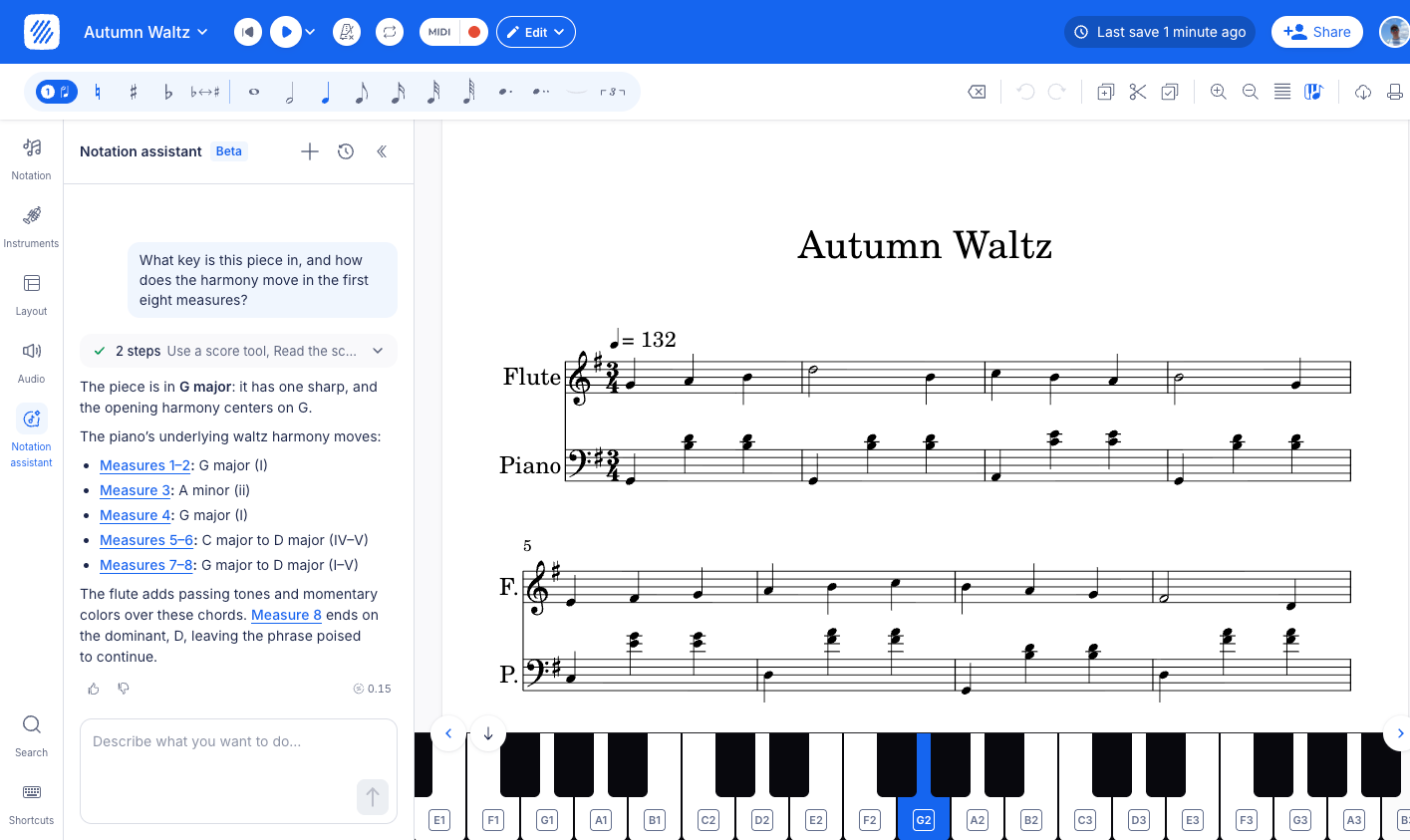
"What key is this piece in, and how does the harmony move in the first eight measures?"
Undo and confirmations
Every reply that changes your score has an Undo button. It reverts everything that reply did. It works on the latest change only, and only until you edit the score yourself: after that, use the editor's undo. It never reverts your own edits.
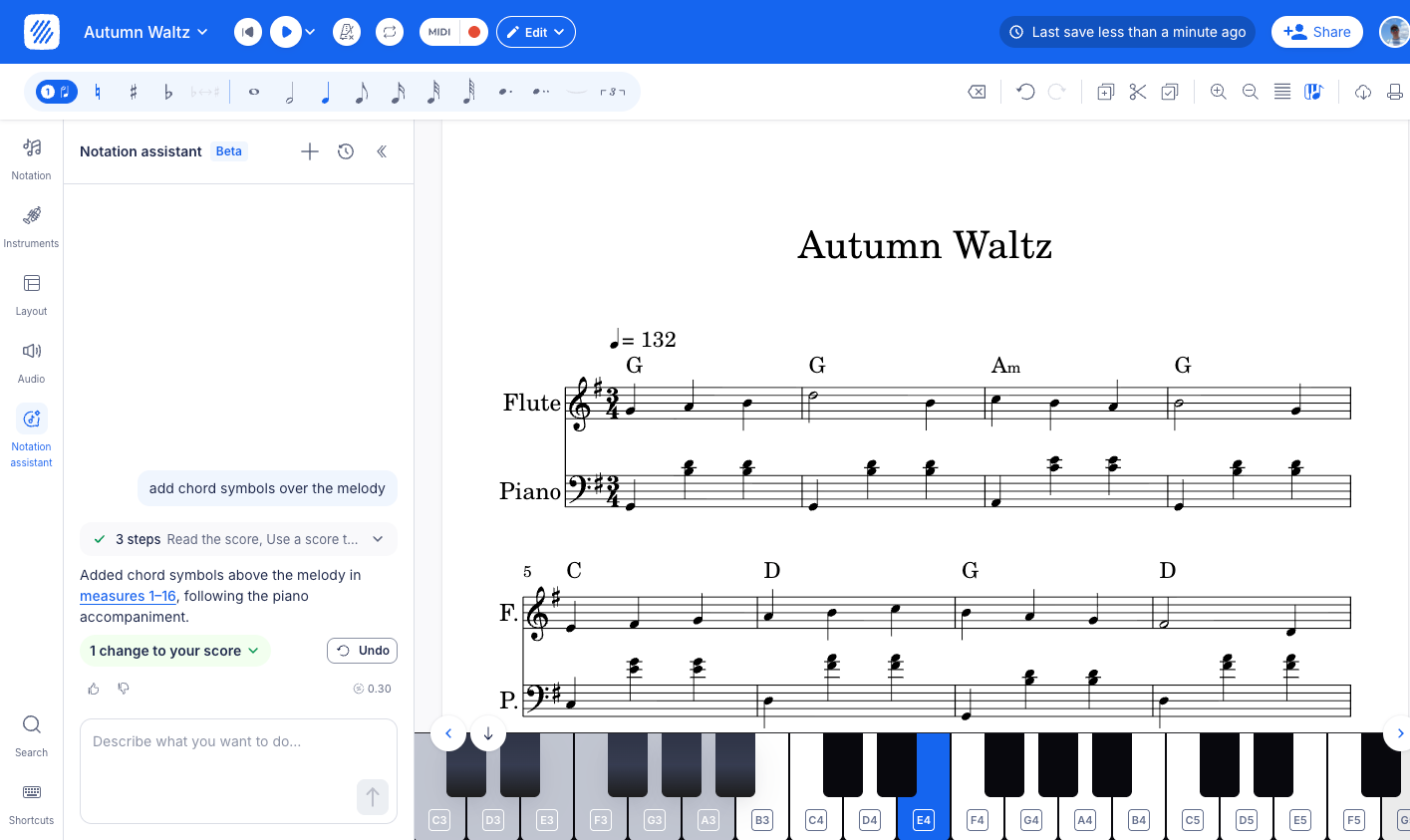
"add chord symbols over the melody"
Before it deletes bars, parts, staves or voices, or rewrites a lot of existing notes, the assistant shows you what will change and waits for your OK. If you do not answer within a few minutes, nothing changes.
What it cannot do yet
- Anything outside your score or music. It only works on the score you have open.
- Final verdicts. It can check ranges, voice leading and playability, but treat its review as a second opinion and check it, especially for wrong notes.
- Very long messages or conversations. A message is limited to 4,000 characters. When a conversation gets too long, it asks you to start a new one.
How much use per credit
The cost depends on the request and on the size of your score. A Flat Power subscription includes 10 credits a month. Typical costs for one request, on a 16-bar score for flute and piano:
| Request | Credits | With 10 credits |
|---|---|---|
| Questions about the score, from a quick fact to a harmony analysis | 0.02 to 0.15 | 60 to 500 |
| Edits and markings, including transposing the whole score | about 0.02 | about 500 |
| Chord symbols over a 16-bar melody | about 0.3 | about 30 |
| A new bass line, 8 bars | about 0.25 | about 40 |
| A countermelody or a four-part harmonization | 0.6 to 1.2 | 8 to 16 |
Each reply shows what it cost and how many credits you have left. One message never costs more than 2 credits, and a reply that fails without changing anything is not charged, up to 2 credits a day. How the assistant uses your credits.
Sample requests
Type the way you would message a fellow musician. A few that save real work:
Understand your score
- "what key is this in, and how does the harmony move in the first 8 bars?"
- "is the flute part too hard for a beginner?"
- "what note does the clarinet actually sound in bar 3?"
- "where does the cello sit too high?"
Clean up a passage
- "add chord symbols over the melody"
- "give the first phrase some dynamics, all parts"
- "staccato on all the eighths in the bass, bars 1-4"
- "fade out the last two bars"
Write and arrange
- "harmonize this melody for four voices"
- "walking bass in the LH, bars 21-24"
- "countermelody for the 2nd violins under the 1sts, bars 6-9"
- "fingerpicking pattern in the guitar tab, bars 1-8"
- "basic rock beat on the drums, bars 5-8"
- "my students struggle with this, can you make the violin part easier?"
Then keep going from its reply: "make it simpler", "same for the next phrase", "undo that".
Tips for good results
- Say where. Name the bars and the part, like "bars 5 to 8, Violin I". If you select notes first, still name the bars when the request goes beyond the selection.
- Ask for one new part at a time. Ask for the bass line, check it, then ask for the accompaniment.
- Check what it writes, especially new music. If it is not what you wanted, click Undo and rephrase.
Privacy
To answer, the assistant sends your message, the conversation so far, an outline of the score and the bars you are working on to the provider of the AI model that handles the request, such as OpenAI or Anthropic. They are listed in our subprocessors and do not use what is sent through their API to train their models. Flat does not train AI models on your scores either.
Your conversations are saved with the score, so you can come back to them. A conversation you delete disappears straight away and is permanently deleted after 30 days.
Give feedback
Each reply has a thumbs up and a thumbs down. With a thumbs down you can say what went wrong and add a comment. We read every rating to improve the assistant, so rate the replies that surprised you, good or bad.
Frequently asked questions
Why don't I see the assistant in my editor?
Check that your plan includes it, that you joined the beta, and that you are on the Flat website on a computer.
Still stuck? Contact us - we are always one message away.