How to change the music font in Flat
Last updated September 23, 2026
The music font in Flat is the typeface used to draw noteheads, clefs, accidentals, rests, and every other musical symbol in a score. Flat implements the SMuFL standard in its engraving engine and offers 13 music fonts, classical and handwritten, all available under open licenses and applied to the whole score at once.
How do I change the music font?
Flat keeps this setting in the Layout tab of the left panel. Scroll to Music font and choose the font you want to use for your sheet music. The score is re-engraved immediately in the new font, so you can compare a classical and a handwritten face on your own music before deciding.

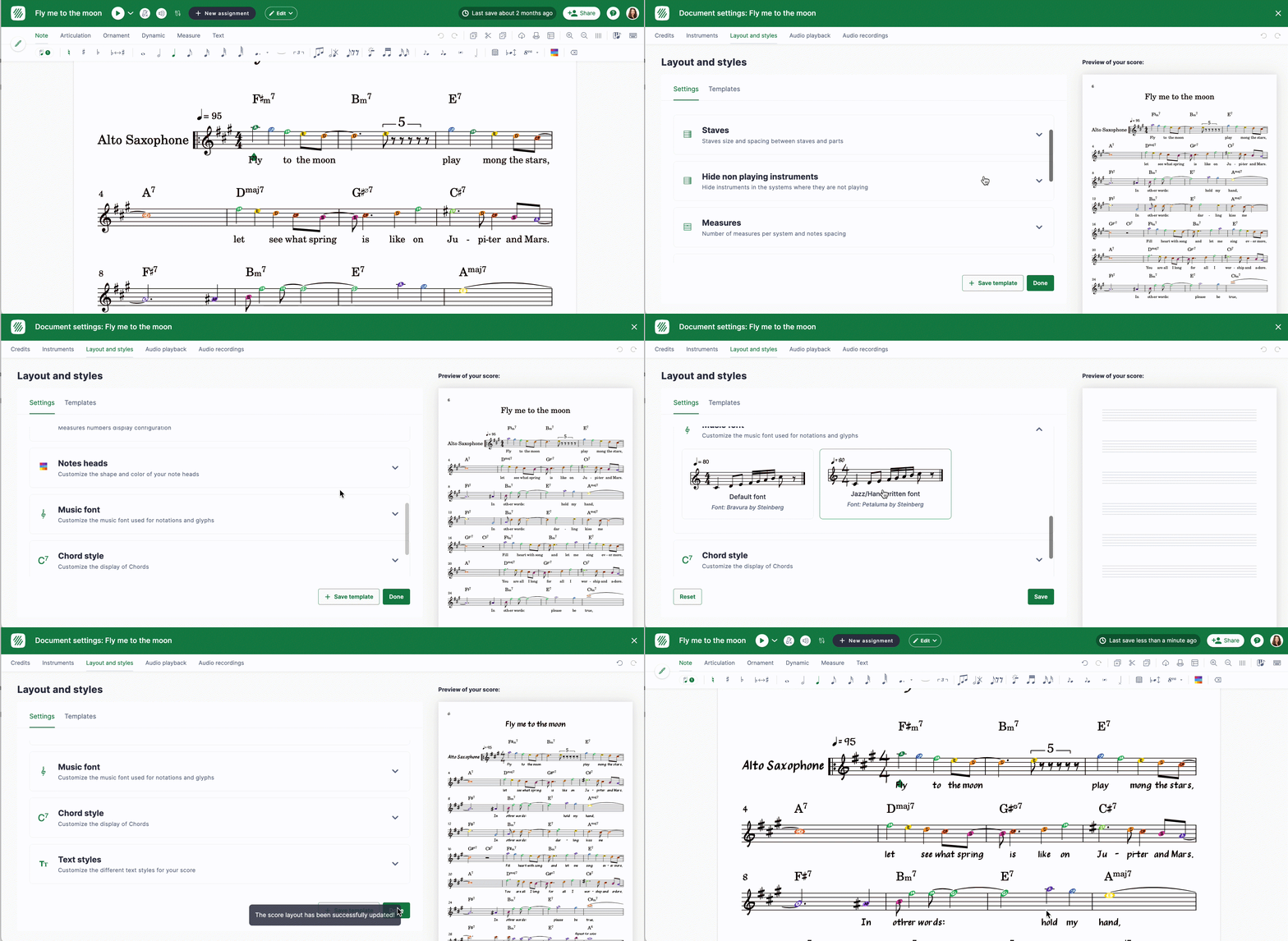
At this time, there are 13 music fonts available.
Flat includes two different music fonts that can be used to display your sheet music: Classical and Jazz/Handwritten.
Switching to the handwritten font Petaluma also changes the default text font to Petaluma Script - see text styles.
Which music fonts does Flat include?
Flat's music fonts are all SMuFL fonts published under open licenses, so what you see on screen is what you can print and share. In 2015 we implemented SMuFL (Standard Music Font Layout) in our music engraving engine, starting with Bravura. We have since added a range of classical and handwritten music fonts, all available under open licenses:
| Font | Designed by | License |
|---|---|---|
| Bravura | Steinberg | SIL Open Font License |
| Petaluma (handwritten) | Steinberg | SIL Open Font License |
| Leipzig | RISM Digital Center for Verovio | SIL Open Font License |
| Sebastian | Florian Kretlow and Ben Byram-Wigfield | SIL Open Font License |
| Leland | Martin Keary and Simon Smith for MuseScore | SIL Open Font License |
| Gootville | Grzegorz Pruchniakowski for MuseScore | SIL Open Font License |
| Finale Maestro, Broadway, Ash, Engraver, Jazz, Legacy | MakeMusic, Inc. | SIL Open Font License |
| Eugene | Mikko Patama | SIL Open Font License |
Frequently asked questions
What is SMuFL?
SMuFL, the Standard Music Font Layout, is the specification that says where each musical symbol sits inside a font file. Flat implemented it in its engraving engine in 2015, starting with Bravura, which is why fonts from Steinberg, MuseScore, MakeMusic, and independent designers all work in the same editor.
Which font should I use for a jazz chart?
A handwritten face. Petaluma is Flat's handwritten font from Steinberg, and the Finale Broadway and Jazz families are also designed for that look. They imitate hand-copied parts, which is the convention for big band and combo charts.
Does the music font change the lyrics and titles too?
Not directly - the music font draws musical symbols, while words are controlled by the text styles. One exception: choosing Petaluma sets the default text font to Petaluma Script so the words match the handwritten notation.
Can I use these fonts outside Flat?
The fonts are published under open licenses, listed in the table above, so their own terms apply. Each licence link points to the exact text Flat ships for that family - check it before redistributing a font or bundling it in another project.