How to add a buzz note in Flat
Last updated October 13, 2026
A buzz note in Flat is a dampened, unpitched stroke, also known as a muted note, a dead note, or a percussive note. It is commonly used on string instruments, guitar, and bass to create a percussive effect: the string is struck but muffled so it buzzes rather than rings.
How do I add a buzz note?
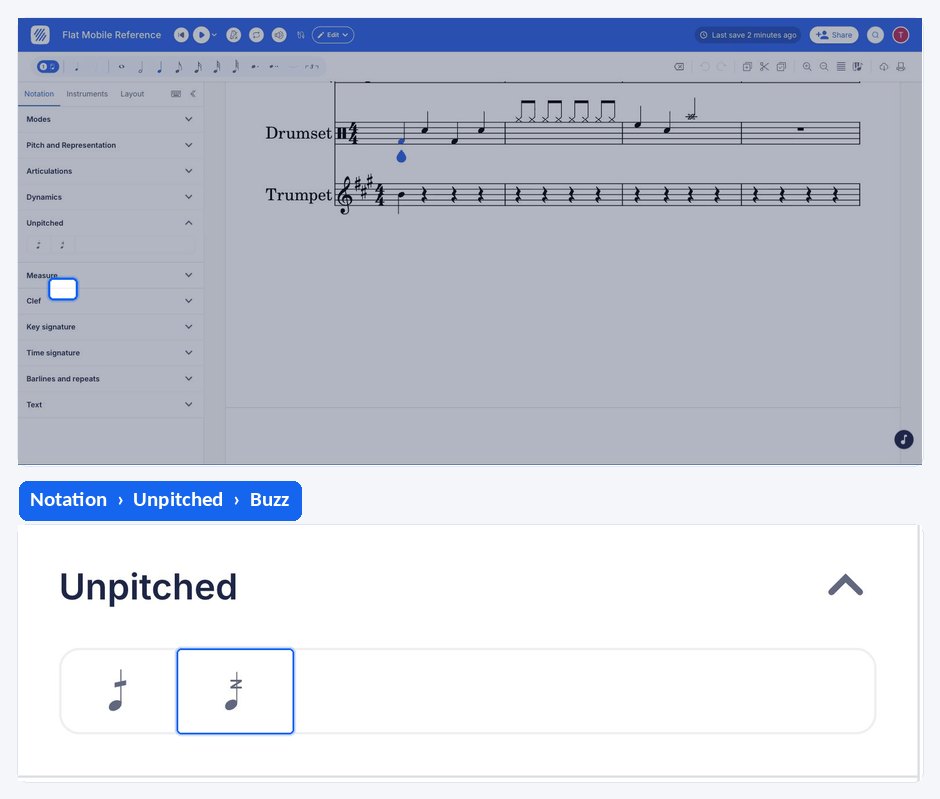
Select the note you want to dampen, then open the Notation tab in the left panel and click the buzz note symbol under Unpitched. The Unpitched section appears as soon as the selected note sits on an unpitched part such as a drum set, and it holds the drum roll and the buzz. Flat marks the note as percussive rather than pitched, so it is struck and muffled instead of ringing out.
Frequently asked questions
What is the difference between a buzz note and a dead note?
Both produce a muffled, unpitched sound, and the terms overlap in everyday use. In Flat they are separate tools: the dead note replaces the notehead with an "x" and has its own muted playback samples for plucked strings, while the buzz note is applied as an articulation to a note that keeps its notehead.
Which instruments is a buzz note used on?
It is commonly used on string instruments, guitar, and bass, where striking a damped string gives a percussive buzz instead of a clear pitch. The notation itself is not restricted to those instruments, but that is where the technique it describes belongs.
Is a buzz note the same as a ghost note?
No. A ghost note is played softly and keeps a trace of pitch, written with its notehead in brackets. A buzz note is struck at normal strength but muffled, so what you hear is a dampened, unpitched percussive sound rather than a quiet version of the written note.