How to add bends, pre-bends, and releases in Flat
Last updated October 13, 2026
A bend in Flat is a fretted-instrument marking that shows the string being pulled to raise the pitch. Flat writes three related markings - bend, pre-bend, and release - on a tablature staff, lets you combine them on the same note, and ties them together to build longer bend patterns.
Where are the bend tools?
The bend tools sit in the left panel, in the Notation tab, under Measure. Select the note you want to bend on the TAB staff, then click the marking you need.
| Feature | Location | Icon |
|---|---|---|
| Bend | Notation > Measure |  |
| Pre-Bend | Notation > Measure |  |
| Release | Notation > Measure |  |
What are bends?
Bends is a fretted instruments technique, which consists of pulling the string in order to raise the pitch. Flat notates the movement above the tablature, so a player reads how far the pitch travels and when it comes back down.
How do I use bends, pre-bends, and releases?
Select the note on the TAB staff, then click the marking you want under Measure. There are three tools for bends on Flat:
- Bending is used to increase the tension on the string, so the pitch gets higher.
- Releasing is used to decrease the tension on the string, so the pitch gets lower.
- Pre-bending means that there is already some tension on the string when playing the note.
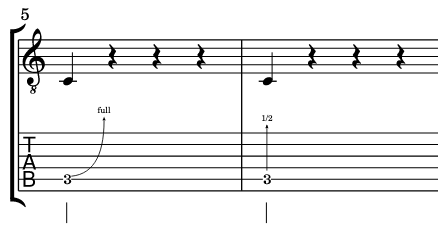
Here are some simple bends configurations.
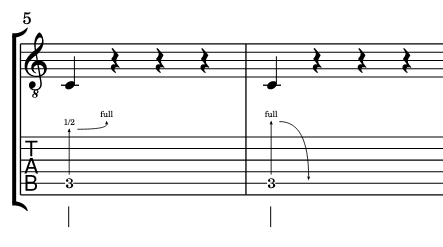
You can also mix the pre-bend with bends or release.
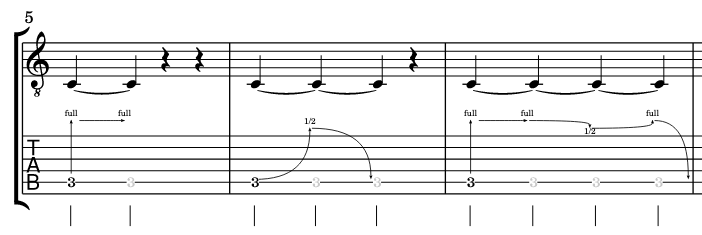
The best stuff is when you start playing with ties. You can make really interesting bend patterns:
Where are the bend tools?
The bend tools sit in the Measure section. Select the note you want to bend on the TAB staff, then choose the marking you need - bend, pre-bend, or release.
| Feature | Icon |
|---|---|
| Bend | |
| Pre-Bend | |
| Release | |
What are bends?
Bends is a fretted instruments technique, which consists of pulling the string in order to raise the pitch. Flat notates the movement above the tablature, so a player reads how far the pitch travels and when it comes back down.
How do I use bends, pre-bends, and releases?
There are three tools for bends on Flat. Bending is used to increase the tension on the string, so the pitch gets higher. Releasing is used to decrease the tension on the string, so the pitch gets lower. Pre-bending means that there is already some tension on the string when playing the note.
You can also mix the pre-bend with bends or release, and tie bent notes together to build longer bend patterns.
Select the note on the TAB staff, drag the tool palette up, and tap the bend, pre-bend, or release you need.
Frequently asked questions
What is the difference between a bend and a pre-bend?
A bend starts at the written pitch and raises it by pulling the string while the note sounds. A pre-bend means the string is already under tension when the note is struck, so the higher pitch is heard from the start. A release then lowers the pitch by letting the tension go.
How do I write a bend that goes up and then back down?
Combine a bend with a release on the same passage, and tie the notes together. Flat draws the full shape above the tablature, so the player reads the rise and the return as one gesture rather than two unrelated markings.
Can I write bends on a bass or another fretted instrument?
Yes. Bends, pre-bends, and releases are fretted-instrument markings and work on any part with a tablature staff - bass, ukulele, banjo, and the rest - not only on a six-string guitar.
Which other guitar techniques can I add to a tab?
Flat also writes hammer-ons and pull-offs, slides, palm mute and let ring, and up and down strokes. Each is a marking you apply to a selected note on the TAB staff.