How to add repeat endings in Flat
Last updated November 4, 2026
A repeat ending in Flat marks which measures are played on each pass through a repeated section. Flat provides numbered endings that work together with repeat barlines: they can be applied to a single measure or to a range, several numbers can share one measure, and each button is a toggle.
Which tool adds a repeat ending?
The repeat ending tools sit in the Measure section of the Notation tab, in the editor's left panel. There is one button per ending number, and each is a toggle - clicking an active ending removes it from the selected measures.
| Feature | Where to find it | Icon |
|---|---|---|
| Repeat Ending | Notation tab, Measure section |  |
How do repeat endings work?
The repeat ending works with repeat barlines. Here's how it typically works: first, the player plays the measures between the repeat barline, starting with the one marked "1". Then, when playing again, they skip the measures marked "1" and play the ones marked "2". You can use these techniques to have a group of measures played more than once, or to change which measures are played at the end of a repeat section.

How do I add a repeat ending?
Open the Notation tab in the left panel, choose the first measure of the section where you want the repeat ending, then click the repeat ending button you want under Measure. If the repeat ending encompasses multiple measures, you can select a range of measures, then click on the repeat ending button.
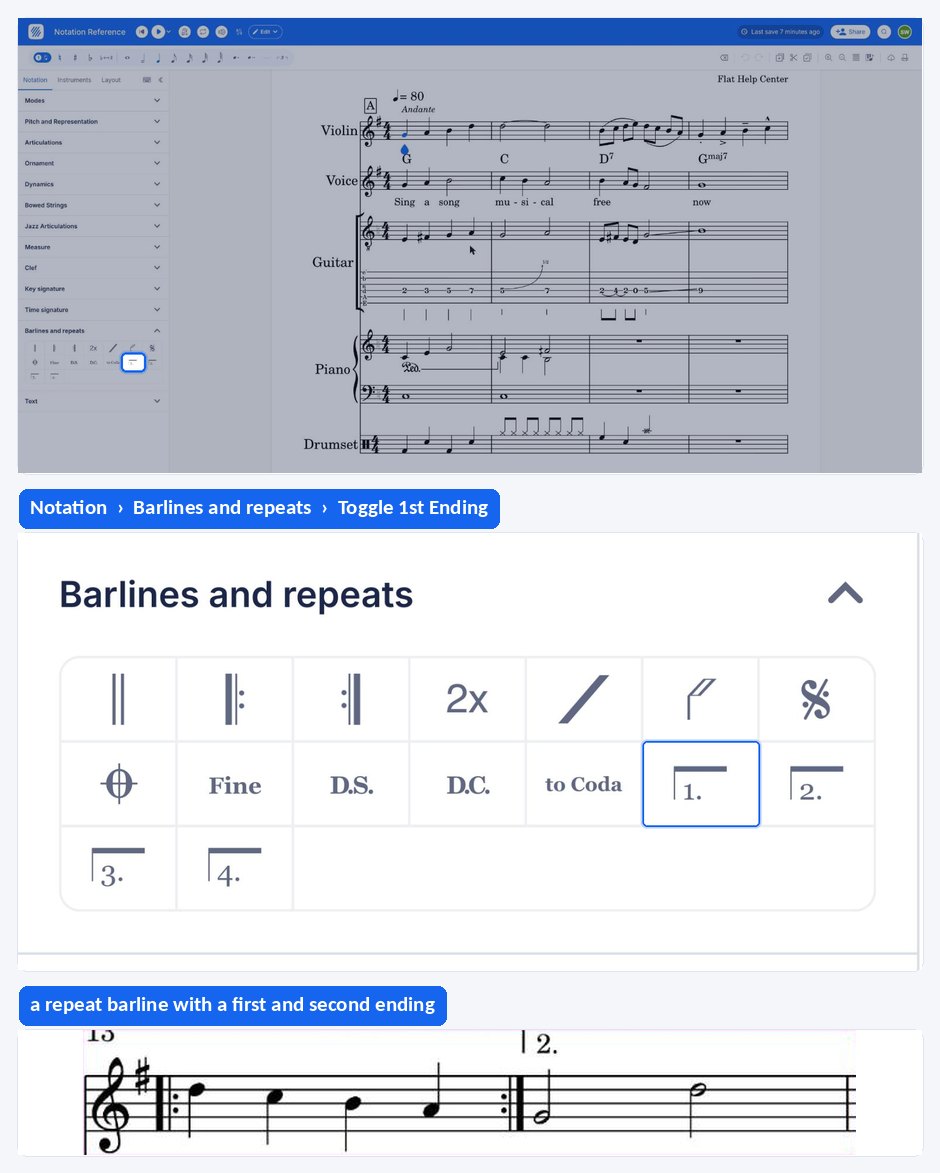
These buttons are toggle buttons: to remove an ending, click on one of the active endings under Measure.
How do repeat endings work?
The repeat ending works with repeat barlines. Here's how it typically works: first, the player plays the measures between the repeat barline, starting with the one marked "1". Then, when playing again, they skip the measures marked "1" and play the ones marked "2". You can use these techniques to have a group of measures played more than once, or to change which measures are played at the end of a repeat section.
| Feature | Icon |
|---|---|
| Repeat Ending | |
How do I add a repeat ending?
An ending is applied to the first measure of the section it covers, or to a range of measures when it spans several of them. The ending buttons are toggles, so applying an active ending again removes it.
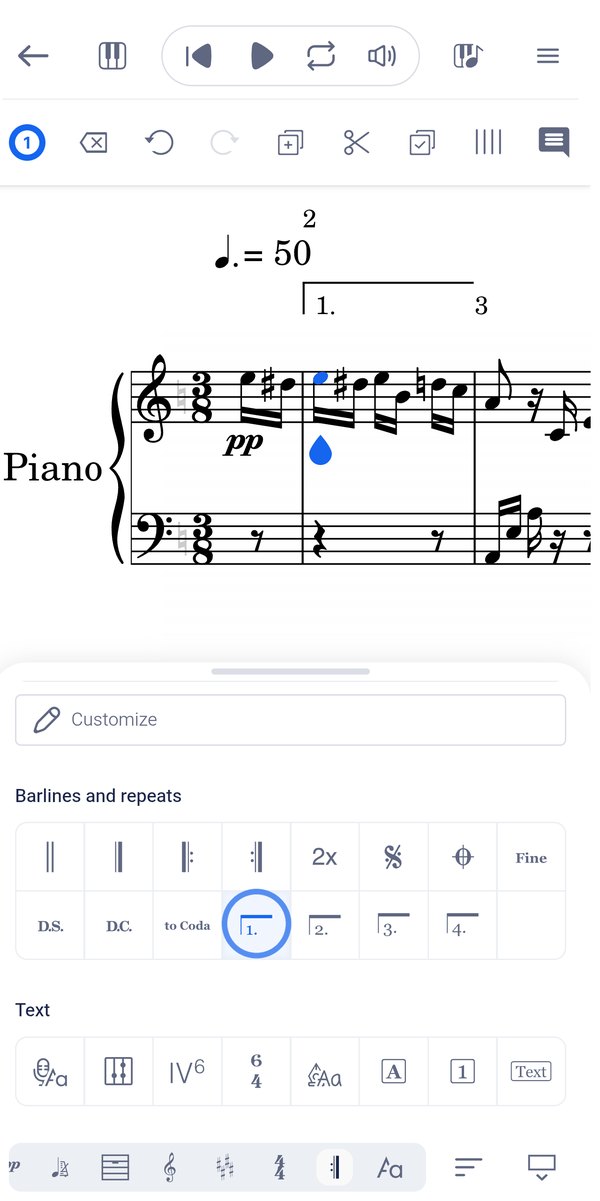
Tap the first measure of the section, drag the tool palette up, and tap the repeat ending you want under Barlines and repeats. If the ending covers several measures, select that range of measures before tapping the button.
Frequently asked questions
Do I need repeat barlines for an ending to work?
Yes. The repeat ending works with repeat barlines: the left and right repeat signs wrap the section that is played twice, and the numbered endings say which measures belong to the first pass and which to the second.
Can one measure carry more than one ending number?
Yes. You can also have more than one ending on a single measure by clicking on the ones you want - useful when the same measures are played on, say, the first and third passes and a different measure closes the section on the last one.
What is the difference between a repeat ending and a measure repeat?
A repeat ending changes which measures are played on each pass through a repeated section. A measure repeat is a shorthand symbol saying that a measure repeats the content of the previous one, which is a way of writing the music rather than a jump instruction.