How to add and remove a mute in Flat
Last updated September 23, 2026
A mute in Flat is an articulation that marks where a player fits or removes a mute, the device that changes an instrument's sound quality and lowers its volume. Flat writes both the mute and unmute markings from the Articulations section and applies the muted timbre to its HQ brass instruments during playback.
Where do I find the mute and unmute buttons?
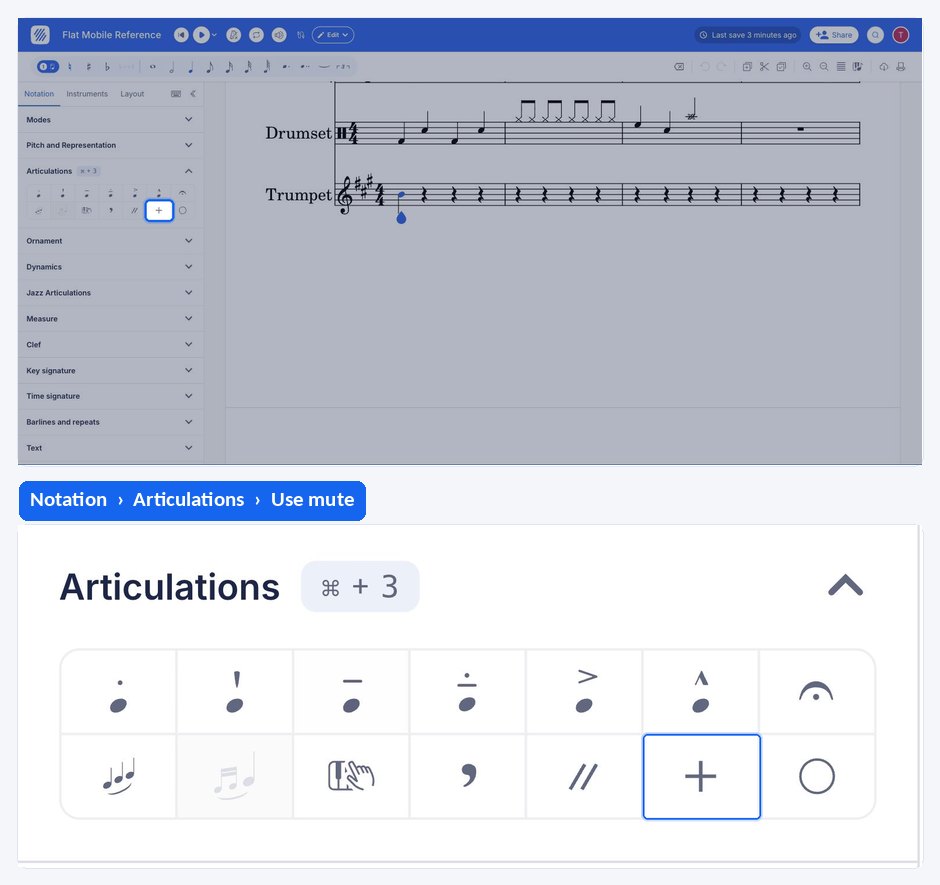
Both markings live in the left panel, in the Notation tab, under Articulations. Select a note first, then click the button you need: Mute writes the mute marking, Unmute writes the marking that takes it off again.
| Feature | Location | Icon |
|---|---|---|
| Mute | Notation > Articulations |  |
| Unmute | Notation > Articulations |  |
What is a mute?
The mute is a device that you attach to a music instrument, to change the instrument's sound quality, and/or reduce its volume. It can be either attached for the whole duration of the performance, or be added/removed during the performance. Those can also be used for practice purposes, with the intent of reducing the volume of the sound produced by the instrument.
How do I add or remove a mute?
Select the note where the change happens, then open the Notation tab in the left panel and click Mute under Articulations to mute the instrument, or Unmute to take the mute off again. Flat writes the marking above the staff at the selected note.
Which instruments are affected by the mute in Flat?
Currently, all our HQ brass instruments can have their sound affected by the mute on Flat. The marking is written on any part, but the timbre change is applied to those HQ brass sounds. See the full list of HQ instruments to check what your part uses.
Where do I find the mute and unmute buttons?
| Feature | Icon |
|---|---|
| Mute | |
| Unmute | |
What is a mute?
The mute is a device that you attach to a music instrument, to change the instrument's sound quality, and/or reduce its volume. It can be either attached for the whole duration of the performance, or be added/removed during the performance. Those can also be used for practice purposes, with the intent of reducing the volume of the sound produced by the instrument.
How do I add or remove a mute?
Select the note where the change happens, drag the tool palette up, and tap Mute under Bowed Strings to mute the instrument, or Unmute to take the mute off again. Flat writes the marking above the staff at the selected note.
Which instruments are affected by the mute in Flat?
Currently, all our HQ brass instruments can have their sound affected by the mute on Flat. The marking is written on any part, but the timbre change is applied to those HQ brass sounds. See the full list of HQ instruments to check what your part uses.
Frequently asked questions
Can a player add and remove a mute in the middle of a piece?
Yes. A mute can be attached for the whole duration of the performance, or added and removed during the performance. Select the note where each change happens and write the matching marking there, so the player has time to fit or remove the device.
Why does my muted part sound the same in playback?
Flat currently applies the muted sound to its HQ brass instruments. If the part uses another instrument, the marking still appears in the notation but the playback sound is unchanged. Check which instrument the part uses in the list of HQ instruments.
Is a mute only used to change the timbre?
No. Mutes change the instrument's sound quality, but they also reduce its volume, so players use them for practice as well as for the written colour. Flat notates both uses the same way, with the mute and unmute markings above the staff.