How to add slash and rhythmic notation in Flat
Last updated September 24, 2026
Slash notation in Flat replaces the content of a selected range with rhythmic slashes, so the performer improvises over the chord symbols instead of reading written pitches. Flat offers two variants: Slash, where the slashes follow the meter, and Rhythmic, where the durations and rests you wrote are kept.
What are the slash and rhythmic tools?
Flat provides two improvisation tools. Slash fills the selected range with slashes that follow the meter. Rhythmic writes slashes too, but keeps the durations and rests already in the range, so the written groove survives. Both replace the pitches of the range you selected.
| Feature | Tool | Icon |
|---|---|---|
| Slash | Slash |  |
| Rhythmic | Rhythmic |  |
What is slash notation used for?
Slashes are used in a section to indicate that the performer is free to improvise. The slashes in the measures follow the meter, and there are chord indications above some slashes to indicate which notes to use for improvisation.

The slash section will replace the previous content, not taking into account pitches, rests or durations.
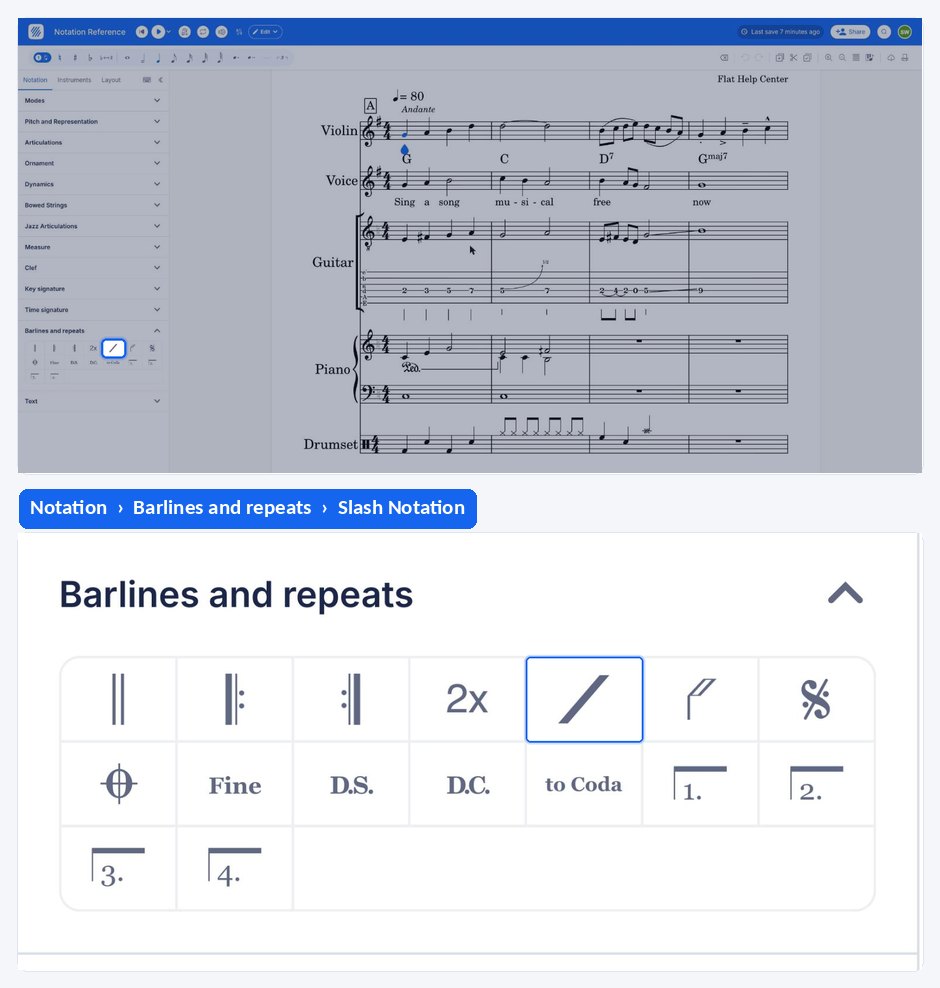
Applying slash notation discards the pitches, rests, and durations already written in the selected range. Undo restores them if you applied it by mistake.
How do I use rhythmic notation instead?
If you want more granularity on the rhythm of the slashes, you can use the rhythmic notation instead. The rhythmic section will replace the previous content by slashes, but will keep the durations and rests.
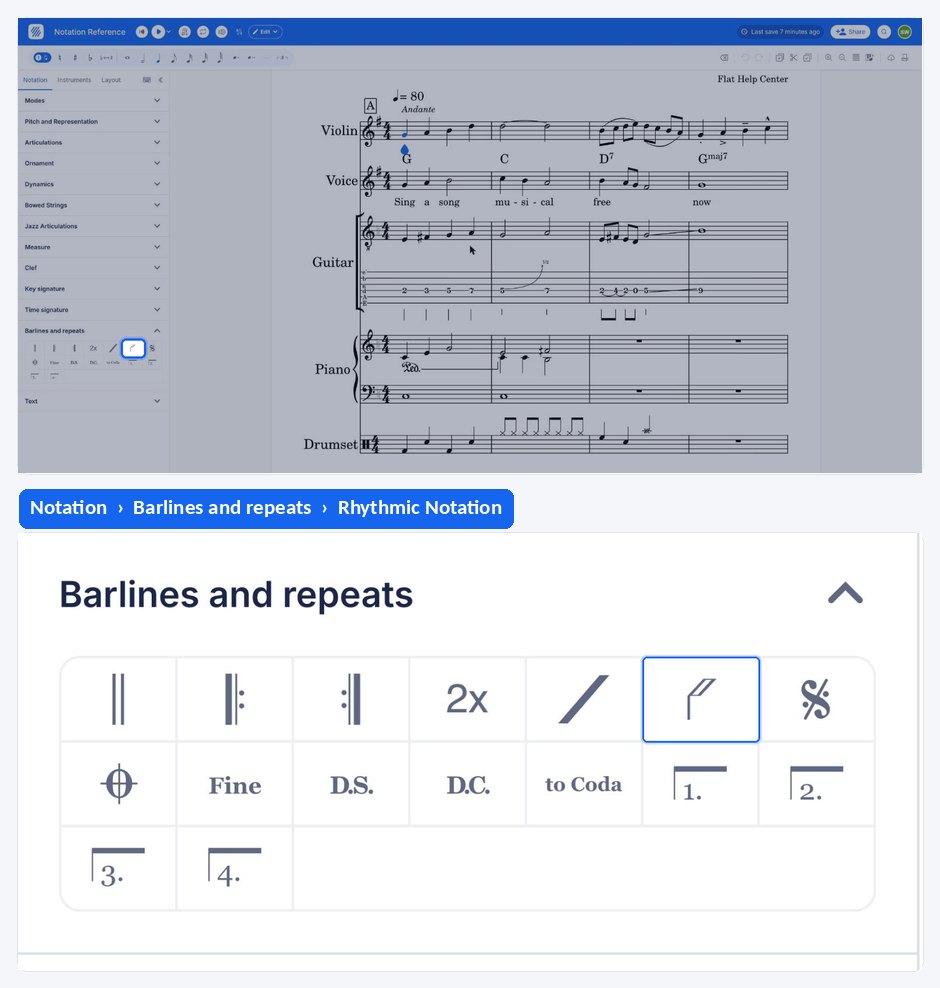
When you are in the rhythmic mode, you can add or remove slashes the same way you are adding notes, and you can change the notes and slashes durations.
What are the slash and rhythmic tools?
Flat provides two improvisation tools. Slash fills the selected range with slashes that follow the meter. Rhythmic writes slashes too, but keeps the durations and rests already in the range, so the written groove survives. Both replace the pitches of the range you selected.
| Feature | Icon |
|---|---|
| Slash | |
| Rhythmic | |
What is slash notation used for?
Slashes are used in a section to indicate that the performer is free to improvise. The slashes in the measures follow the meter, and there are chord indications above some slashes to indicate which notes to use for improvisation. The slash section replaces the previous content, not taking into account pitches, rests or durations.
Select the range you want to improvise over, drag the tool palette up, and tap Slash Notation under Barlines and repeats. Flat replaces the pitches in the range with slashes that follow the meter.
Applying slash notation discards the pitches, rests, and durations already written in the selected range. Undo restores them if you applied it by mistake.
How do I use rhythmic notation instead?
Rhythmic notation gives you more granularity on the rhythm of the slashes. The rhythmic section replaces the previous content by slashes, but keeps the durations and rests. In rhythmic mode you can add or remove slashes the same way you add notes, and change the notes and slashes durations.
Select the range, drag the tool palette up, and tap Rhythmic Notation under Barlines and repeats instead. Flat writes slashes but keeps the durations and rests already in the range, so the written groove survives.
Frequently asked questions
What is the difference between slash notation and rhythmic notation?
Slash notation follows the meter: it replaces everything in the range with one slash per beat, ignoring the pitches, rests, and durations you wrote. Rhythmic notation keeps those durations and rests and turns the noteheads into slashes, so the written rhythm is still readable and still editable.
Will I lose the notes I already wrote?
Yes. Both tools replace the content of the selected range - slash notation drops pitches, rests, and durations, and rhythmic notation drops the pitches while keeping the rhythm. Nothing is lost permanently: undo brings the original passage back.
Can I change the rhythm of the slashes after applying them?
Yes, in rhythmic mode. Slashes behave like notes there: add or remove them exactly as you add notes, and change their durations the same way. Plain slash notation has no editable rhythm of its own, since it always follows the meter of the measure.
How do I show players which notes to improvise on?
Write chord symbols above the passage. The chord indications placed above the slashes are what tell the performer which notes to use for improvisation - see chord symbols for how to add them to a score in Flat.