How to change the string assigned to a note in Flat
Last updated September 23, 2026
Changing the string assigned to a note in Flat moves it to a different string of the tablature while keeping the same pitch. On guitar, bass, and other plucked string instruments this is useful when you want to play the same note on a higher or lower string - for example, to make a passage easier to finger or to match a specific playing position.
How do I move a note to another string?
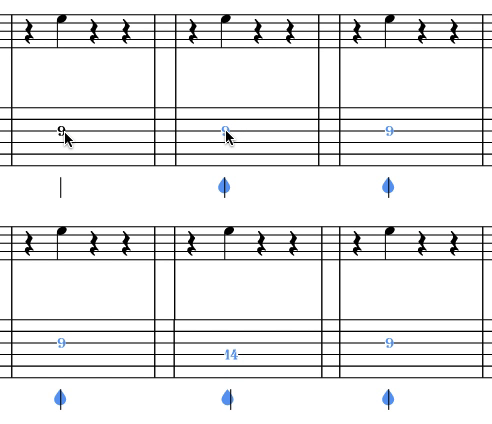
Select the note on the TAB staff, then use the keyboard shortcuts below. Flat keeps the pitch and rewrites the fret number for the new string, so the notation staff is unchanged and only the tablature moves.
| Feature | Keyboard shortcut |
|---|---|
| Go to the upper string | Ctrl + ↑ or ⌘ + ↑ |
| Go to the lower string | Ctrl + ↓ or ⌘ + ↓ |
If there is already a fret value for the string we will go directly to the next available.
Frequently asked questions
Does moving a note to another string change how it sounds?
No. The pitch stays the same - only the string and the fret number change, so the standard notation staff is untouched and playback is identical. You are choosing where the note is played on the fretboard, not what note it is.
Why did my note skip a string?
Because the string you aimed for was already occupied. If there is already a fret value on that string at the same position, Flat goes directly to the next available string rather than stacking two notes on one string.
Why can I not move a note any further?
Because the pitch cannot be played on the remaining strings with the part's current tuning and capo. Changing the tuning or capo, or adding strings to the instrument, changes which positions are reachable for that note.
Do hammer-ons and pull-offs need both notes on the same string?
Yes. The two notes connected by a hammer-on or pull-off must be on the same string, so moving one of them to another string is often what you need before - or after - adding the marking.