How to adapt the duration of the next rest in Flat
Last updated October 13, 2026
Adapting the next rest in Flat is the editing behaviour that resizes the rest following a note you have just written so it matches that note's duration. Flat applies it by default because it suits most input, and it can be switched off when you want the existing rest left exactly as it is.
Where is the next rest duration option?
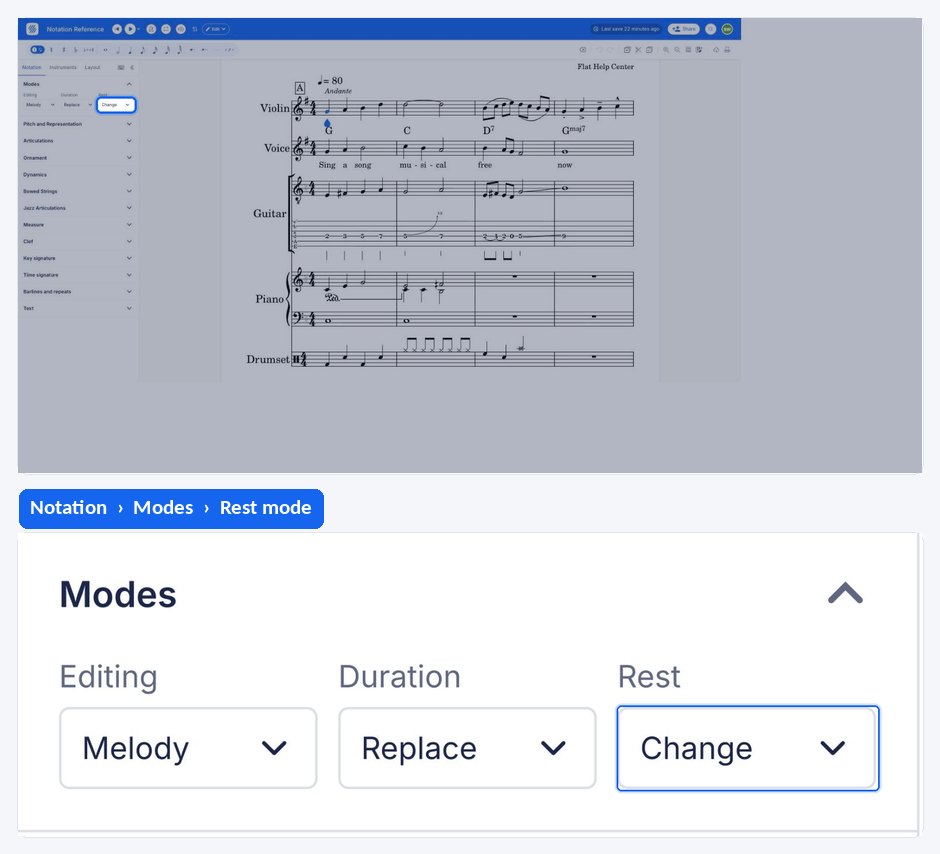
The option lives in the left panel, under the Notation tab, in the Modes section with the other editing, duration, and rest behaviours. It is a toggle rather than a one-off action: whatever you set stays in effect for the notes you write afterwards.
| Feature | Where it is | Icon |
|---|---|---|
| Adapt the next rest duration | Notation tab, Modes |  |
What happens to the rest after a note I write?
In the default mode of editing, when you add a note and the next item is a rest, that rest changes its duration to the duration of the note you just added. This is the default behaviour because it is useful in many contexts, such as inputting a group of eighth notes in the context of a 4/4 meter.
Can I stop Flat from resizing the next rest?
Yes. You can disable this behaviour if you want, so the system does not resize the duration of the next rest. The rest then keeps the value it already had, and the note you write is fitted around it rather than driving it, which is what you want when the rests in a bar are already correct.
Frequently asked questions
Why does the rest after my note keep changing length?
Because the default editing behaviour resizes it to match the note you just wrote. It is designed for fast input - writing a run of eighth notes in 4/4 keeps producing an eighth rest ahead of the cursor - and it can be switched off when you would rather the existing rests stayed put.
Does this setting affect notes as well as rests?
No. It only governs what happens to a rest immediately after the note you write. How notes around the cursor are treated is decided by the editing mode instead - see insert mode for the behaviour that pushes content right rather than overwriting it.
Is the setting saved for my next score?
It is an editing behaviour rather than something stored in the music, so it governs how you write rather than what the score contains. Turning it off and on again at any point changes nothing that is already written - only what happens to the rest ahead of the next note you add.