How to add harmonics in Flat
Last updated October 13, 2026
A harmonic in Flat is a string technique notated on the note it belongs to. Flat writes natural harmonics either at their Sounding Pitch or at their Touching Pitch, and artificial harmonics as the pair of notes the player stops and touches, so string and fretted parts read the way performers expect.
Where are the harmonic tools?
Harmonics are available in the Articulations section of the Notation tab for string instruments, and in the toolbar Tab for fretted instruments. Flat provides three of them: two ways of writing a natural harmonic, and the artificial harmonic.
| Feature | Icon |
|---|---|
| Natural Harmonic: Sounding Pitch |  |
| Natural Harmonic: Touching Pitch |  |
| Artificial Harmonic: Touching Pitch |  |
What is a harmonic?
Harmonics are a technique of play on string instruments, that is used to reach higher pitches using physical properties. Instead of pressing the string down against the fingerboard, the player touches it lightly at a precise point, and the string vibrates in segments rather than as a whole.
Natural Harmonics
First, there are natural harmonics. On a ringing open string, if you press gently on the exact middle of the string, it will multiply by 2 the frequency of the sound, and you will get a sound one octave higher than the sound of the open string.
There are several places on the string where you can press to create a harmonic. It could be at one-third of the string, resulting in a sound one octave and one-fifth higher. Or at a quarter of the string, that results in a sound 2 octaves higher than the open string.
Artificial Harmonics
So far I only talked about open string. However, it is also possible to create harmonics on stopped strings. For instance, if you want to have a sound an octave higher than the sound of the stopped string, you need to press your finger at the middle of the vibrating section of the string. This is what we call an artificial harmonic.
How do I create harmonics?
Select the note that carries the harmonic, then open the Notation tab in the left panel and pick the tool that matches what you want to write under Bowed Strings: a natural harmonic at its sounding pitch, the pitch you hear when the harmonic is played; a natural harmonic at its touching pitch, the pitch where you gently press the string; or an artificial harmonic.
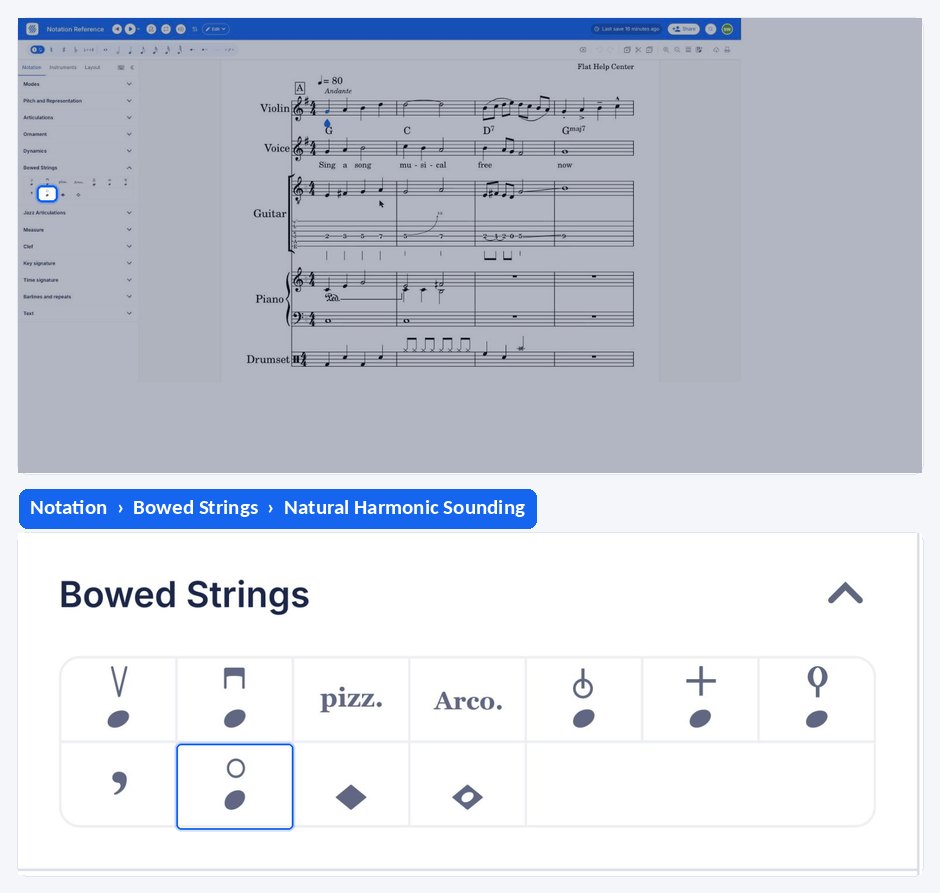
An artificial harmonic is built from two notes, so it is written in a short sequence: add the note on which you gently press the string, click the Artificial Harmonic button, then input the note on which you stop the string.
Frequently asked questions
What is the difference between sounding pitch and touching pitch?
The sounding pitch is the pitch that you hear when you play the harmonic. The touching pitch is the pitch where you gently press the string to create it - the place the finger goes, not the note that rings. Flat can write a natural harmonic either way.
Why does an artificial harmonic need two notes?
Because the player does two things at once: one finger stops the string, and another touches it lightly higher up. Flat writes the touching note, then the note on which you stop the string, which is what tells the performer both where to press and where to touch.
Can I write harmonics for guitar or bass?
Yes. Harmonics are available in the Articulations section for string instruments, and in the Tab toolbar for fretted instruments, so a guitar or bass part written as tablature gets its own harmonic tools.
Which other string techniques can I notate in Flat?
Flat also notates pizzicato, mutes, tremolos, and up and down bow markings. Each is applied to the selected note from the left panel, in the same way as a harmonic.